Webflow is the builder a lot of SaaS teams pick when the website is going to grow into a real content machine: a blog, a changelog, customer stories, docs, several languages. That power comes with a slightly more complex bill than Framer’s.
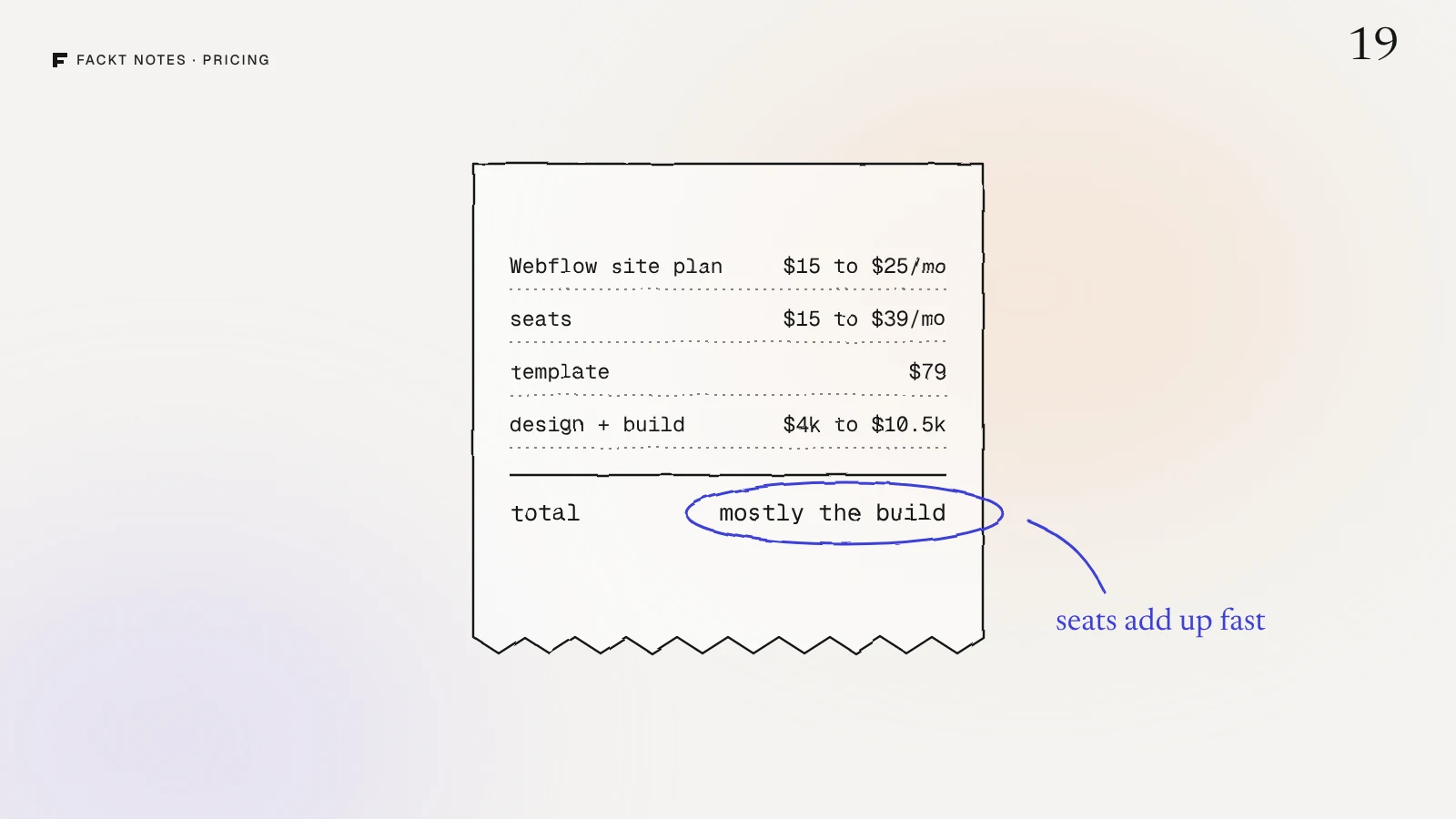
For a typical SaaS, a Webflow website costs $15 to $25 a month for the site plan, plus seats for your team, plus anywhere from about $80 for a template to around $10,000 for a custom landing page designed and built by a studio. Here is the breakdown.
1. The site plan
At the time of writing, Webflow prices each site separately, billed yearly:
| Plan | Price | Good for |
|---|---|---|
| Starter | Free | Building and testing, no custom domain |
| Basic | $15 a month | A marketing site with no CMS content, up to 300 pages |
| Premium | $25 a month | Most SaaS sites: CMS with up to 20,000 items for a blog, changelog and case studies |
| Team and Enterprise | From $2,500 a month | Large sites with big teams and contracts |
The jump that matters for a SaaS is from Basic to a plan with the CMS. The moment you want a blog or customer stories your team can publish on their own, you need it. Webflow changes its plans now and then, so check Webflow’s pricing page before you budget.
2. Seats: the cost people forget
Webflow charges for the people who work in your workspace, on top of the site plan. Full seats, for people who design and build, cost $39 a month each, and limited seats for people who mainly edit content cost $15 a month each, billed yearly. Workspace plans for teams and agencies are priced separately.
For a founder editing the site alone, this barely matters. For a marketing team of five, it can cost more than the site plan itself. Plan who really needs to be in Webflow, and who only needs to publish posts.
3. A template, or a custom design
A template is the cheapest way in. Our own Webflow template, Carefront, sells for $79 on the Webflow Marketplace, and most sit in a similar range. You get a working site with a CMS already set up. You still need to rewrite the copy, swap in your product and adjust the design so it does not look like everyone else who bought it.
A custom design starts from your product and your buyer, then gets built in Webflow with components and CMS collections your team can use. That is where the budget goes from under a hundred dollars to thousands.
4. Design and build: who does it
The build cost is about the same in Webflow and Framer, because most of the work is the design and the structure, not the tool. For one SaaS landing page, designed and built, these are the ranges from our website cost calculator:
| Who | One landing page | Five page marketing site |
|---|---|---|
| Freelancer | about $2,000 to $6,500 | about $4,000 to $14,000 |
| Specialist studio | about $4,000 to $10,500 | about $8,500 to $23,500 |
| Large agency | about $7,000 to $17,500 | about $14,000 to $39,500 |
Webflow projects tend to sit toward the top of each range when they include a full CMS setup: collection structure, templates for every content type, and a clear way for the team to add new pages. At Fackt, a Webflow landing page starts at $5,000, designed and built, in 2 to 6 weeks.
5. When Webflow is worth the higher bill
Webflow is the better buy when:
- Content is the growth channel. Many collections, many authors, hundreds of posts or programmatic pages.
- You need roles and workflows. Writers who publish, reviewers who approve, developers who own the structure.
- You publish in several languages and want localization handled in one place.
For a launch page or a small marketing site, Framer is usually faster to design in and cheaper to run. We build in both and compare them honestly in Framer vs Webflow for a SaaS website. For the same breakdown on the other side, read what a Framer website costs.
What it costs after launch
- The site plan and seats, every year.
- New pages and sections as the product changes, booked as small projects or covered by a designer on a monthly plan.
- Content. The CMS is only worth it if someone writes. Budget time for that, not just software.
If you already have a site and want to know what is holding it back, the free audit gives you a video walkthrough and a written list of fixes, ordered by impact, within 2 days.
Quick answers
How much does a Webflow website cost?
The Webflow site plan is $15 to $25 a month billed yearly for most SaaS sites, plus seats for the people who edit it. The design and build is the bigger cost: about $80 for a template you adapt, roughly $2,000 to $6,500 with a freelancer, $4,000 to $10,500 with a specialist studio and $7,000 to $17,500 with a large agency for a single landing page.
Which Webflow plan does a SaaS website need?
A site without a blog or other CMS content can run on Basic at $15 a month billed yearly. As soon as you add a blog, a changelog or customer stories, you need a plan with the CMS, which starts at $25 a month billed yearly.
Why is Webflow more expensive than Framer?
Mostly because of seats and scale. Webflow charges for the people who work in it, and it is built for large CMS sites with many collections, roles and localization. For a small SaaS marketing site the difference is a few dollars a month. For a big content site, Webflow's structure is often worth it.
Can our marketing team edit a Webflow site without a developer?
Yes, if the site is built for it. A good Webflow build gives your team CMS collections for posts and case studies and reusable components for new pages, so they publish without touching the layout.